


Skincare Routine: FeelinMySkin
4.769.00 Reviews
App Specs
- Version
- 2.11.370
- Updated On
- License
- Free
- Downloads
- 100,000+
- Developer
- FeelinMySkin
- Categories
- Beauty
- Platform
- Android, iOS
Screenshots

 Analysis by AppCompare
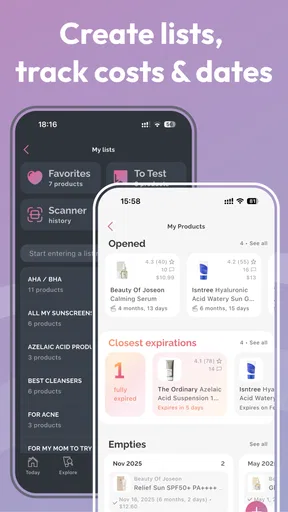
I used to think skincare planning meant keeping a mental list of products and hoping I remembered the order. That works until a new cleanser, serum, or breakout makes the routine harder to track. FeelinMySkin is aimed at that everyday problem: it brings routine planning, product scanning, skin notes, and a community into one beauty app. I find the idea most useful for people who want to make their habits more deliberate, rather than chase a complicated regimen.
It is free to install, with optional in-app purchases, and is developed by FeelinMySkin. The app has a 4.6 average from around 3,400 ratings and has been installed over 100,000 times. It is rated for everyone, though younger users should still approach skincare advice thoughtfully and involve a trusted adult when needed. Its current version is 2.11.320, and it runs on Android 7.0 or later.
Navigating the Skincare Universe
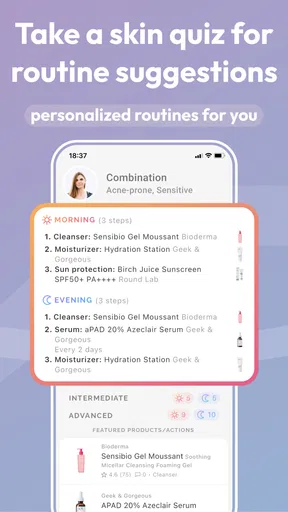
Diving into FeelinMySkin for the first time feels like stepping into a well-organized beauty boutique. The interface is sleek and intuitive, making it super easy to get started. After a quick sign-up, you’re met with a series of questions about your skin type, concerns, and goals. It’s like having a mini skincare consultation right at your fingertips.
The app asks about everything from your skin’s oiliness to specific concerns like acne or wrinkles. I found this initial setup to be quite comprehensive, which is great because it means the app will provide recommendations that are actually relevant to your skin.
Building Your Routine
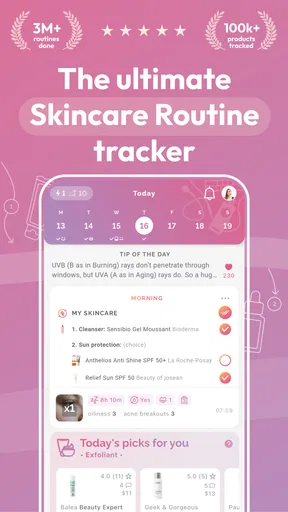
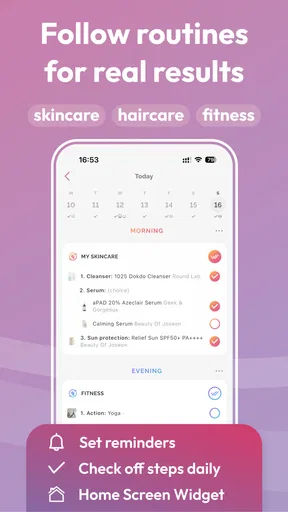
Once you’ve input your details, the magic really begins. FeelinMySkin compiles a personalized skincare routine just for you. This might include recommendations for cleansers, serums, moisturizers, and even SPF. Each product suggestion comes with detailed information about why it’s suited for your skin and how it works.
What I love about this feature is how it takes the guesswork out of choosing products. No more standing in the beauty aisle, overwhelmed and unsure. Plus, the app provides links to purchase these products directly, so you can easily add them to your cart if something catches your eye.
Tracking Your Skin’s Progress
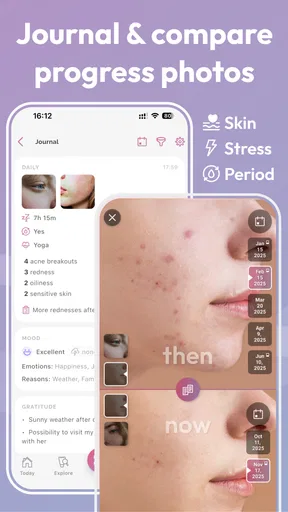
The app doesn’t just leave you hanging after you’ve picked your products. It has a fantastic tracking feature that lets you monitor your skin’s progress over time. By logging daily or weekly updates, you can see how your skin is responding to the routine. This feature is a game-changer because it helps you tweak your routine based on real results.
Worth Reading Before You Choose

EA SPORTS FC Mobile 26 Is a Bigger Football Game, but It Takes Time

Flipboard Shows What News Apps Must Do Beyond the Feed

Switching to Android Auto Means Rethinking Your Driving Routine

Google Calendar Makes a Crowded Week Easier to Manage

Ludo King Makes the Most of the Minutes Between Plans

Baby Panda World Brings Quick Play to Modern Phones, but Its Game Library Feels Busy
The progress tracker includes options to note things like skin texture, oiliness, and any breakouts or improvements. It’s a bit like keeping a diary for your skin, which I found surprisingly satisfying and useful.
More Than Just Products
Beyond product recommendations, FeelinMySkin also offers a wealth of educational resources. There are articles and tips on everything from understanding ingredients to lifestyle changes that can benefit your skin. It’s like having a beauty blog built right into the app.
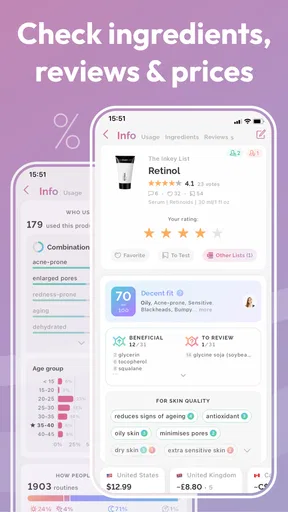
I particularly enjoyed the articles on ingredient safety. They break down what’s in your products in a way that’s easy to understand, which is perfect for anyone who’s ever been confused by long ingredient lists.
Community and Support
Feeling a bit stuck or unsure? The app includes a community feature where you can connect with other users. This section is great for sharing tips, asking questions, and even swapping product recommendations. It’s like having a support group of skincare enthusiasts—people who truly get your obsession!
In addition, customer support is just a tap away if you ever need help navigating the app or have questions about your routine.
Making the Most of a Skin Journal
The best way I’ve found to use a skin journal is to keep entries brief and consistent. Rather than writing a long account every evening, I’d note a few observations—whether my skin felt unusually dry, whether I introduced a product, and whether irritation appeared. This makes the record easier to maintain and more useful when comparing changes later. If I change several products at once, it becomes difficult to tell which one might be responsible, so I’d introduce changes gradually and use the notes to keep track.
There is a practical trade-off here: a journal can reveal patterns, but it cannot prove what caused them. Sleep, weather, stress, and other parts of daily life can affect how skin looks and feels. I’d treat the record as a prompt for better questions, not as a diagnosis or a guarantee that a routine is working.
When the Scanner Helps—and When It Doesn’t
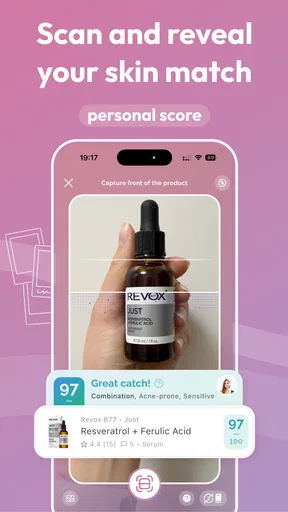
The cosmetics scanner is a useful starting point when I’m considering an unfamiliar product and want to check how it fits into a skin-conscious routine. I would still read the package and ingredient label, especially if I already know I react to a particular ingredient. A scanner’s assessment is best understood as an aid to sorting options, not a substitute for personal experience or professional advice. “Acne safe” can be a helpful filter, but it does not mean a product will suit every person or prevent every breakout.
For a realistic example, imagine I’m at a pharmacy replacing a moisturizer and also looking at a new serum. I can use the app’s product information to narrow my choices, then avoid buying both new items at once. I’d start with one, keep the rest of my routine steady, and make a short journal note if my skin changes. That small workflow is more valuable than scanning every bottle and treating a label as a final verdict.
Readable by Design, With Some Caveats
In ordinary use, the app’s organized layout and question-led setup make it approachable for someone who does not already know skincare terminology. Breaking a routine into product types and explaining why an option is suggested can reduce the amount of information a beginner has to hold in mind. I also like that the journal turns vague impressions into observations that are easier to revisit. Still, an intuitive interface is not the same as a guarantee that every screen will suit every visual or cognitive need.
For someone who benefits from less screen clutter, I’d keep the routine focused and use only the sections that support a real habit: the planner, scanner, or journal. Community posts and educational material can be useful, but they can also add more reading when the main goal is simply to follow a short morning routine. If dense ingredient discussions are tiring, I would look up one product at a time rather than trying to absorb everything at once.
Small-Handed Use, Sensory Comfort, and Privacy
Skincare routines are often checked in a bathroom, while travelling, or with one hand occupied. The app’s planning and logging concept suits quick check-ins, but I would not assume every interaction is equally comfortable for every motor ability. Product scanning and writing notes call for different kinds of input, so someone who finds precise tapping or typing difficult may prefer to keep entries short, use the phone’s own accessibility settings, or do the detailed planning when they have more time and a steadier setup.
There is also a sensory side to skincare that a digital planner cannot resolve. A product may look suitable on screen but still feel unpleasant on the skin, have a texture you dislike, or irritate you. I’d use the app to organize choices, not to pressure myself into keeping a product just because it fits a routine on paper. If a new product causes a concerning reaction, stopping it and seeking suitable medical guidance matters more than logging another entry.
At Home, On the Move, and Offline in Real Life
The app makes the most sense when it supports a decision at the moment you need it: checking an item while shopping, reviewing what you planned before getting ready, or recording a change after washing your face. It can also help someone who travels between home and work keep product choices and observations in one place rather than relying on memory. For a rushed morning, I’d prepare the routine in advance and use the app as a reference, not make the phone another step that has to be completed before leaving.
Cost is worth considering too. The app is free to start, while optional purchases range from $4.99 to $39.99 per item. I’d explore the core workflow before paying for anything and decide whether the added value addresses a specific need. If all I want is a simple recurring checklist, a basic notes app may be enough; if I want product scanning and skincare-specific tracking together, this app has a more focused purpose.
How It Fits Among Other Beauty Tools
Compared with a general habit tracker, FeelinMySkin is more tailored to skincare: it brings product-related guidance and skin observations into the same context as routine planning. A spreadsheet or notes app can be more flexible and may suit someone who wants complete control over every field, but it takes effort to build and maintain. Beauty communities can offer more conversation, while a dedicated journal can make personal records easier to search. The choice depends on whether I want one combined tool or prefer separate apps for each task.
I would skip this app if I dislike maintaining digital records, want a clinician to assess a skin condition, or expect a scanner to make a definitive safety decision. It is also not an ideal fit for someone who already has a simple routine that works and does not want product suggestions or community content. Its strongest case is the person who is trying to reduce confusion, compare products thoughtfully, and notice changes without turning skincare into a full-time project.
Community Advice Without Losing Your Own Judgement
Shared experiences can be reassuring when a product choice feels confusing, but another user’s routine is not a prescription for mine. Skin types, sensitivities, budgets, and preferences differ, so I’d use community discussion to generate questions or discover a product category to research—not to copy a multi-step routine wholesale. The same caution applies to enthusiastic recommendations: a positive result for one person does not establish that the product will work for everyone.
One useful habit is to separate what I know from what I’m guessing. I can record the product I actually used and a concrete observation, such as tightness or a new breakout, without deciding immediately that the product caused it. That approach makes the journal more honest and helps keep online opinions from overpowering my own experience. If a concern is persistent, painful, or worsening, an app community is not a replacement for a qualified healthcare professional.
Who Benefits Most From This Kind of Structure
I see the clearest fit for a beginner who has several products but is unsure how to organize them, or for someone who keeps forgetting what they changed before their skin reacted. It can also suit a careful shopper who wants a second place to review cosmetic information before buying. People with a stable routine may still appreciate the journal when testing one new item, but they do not need to use every part of the app for it to be worthwhile.
By contrast, anyone looking for a medical diagnosis, treatment plan, or certainty about allergies should choose professional care rather than a beauty app. Someone who finds frequent notifications, long reading, or manual tracking stressful may be better served by a simple written routine on the bathroom mirror. I’d rather use the least complicated tool I can maintain than start an elaborate record that quickly becomes a chore.
Final Thoughts
Overall, FeelinMySkin is a fantastic app for anyone looking to demystify skincare. Whether you’re a complete newbie or a seasoned skincare junkie, this app has something for everyone. It’s like having a skincare guru in your pocket, ready to offer advice and cheer you on as you work towards your skincare goals.
So, if you’re ready to take your skincare routine to the next level, give FeelinMySkin a try. Your skin will thank you, and you might just discover that perfect glow you’ve been dreaming of all along!
Pros
- User-friendly and intuitive interface.
- Customizable routine reminders.
- Extensive product database.
- Personalized skincare tips.
- Tracks skin progress effectively.
Cons
- Limited free features available.
- Occasional sync issues with devices.
- Premium version is pricey.
- Requires constant internet access.
- No support for non-English languages.
FAQs for Skincare Routine: FeelinMySkin
What features does FeelinMySkin offer to help manage a skincare routine?
FeelinMySkin provides a comprehensive platform for managing skincare routines, offering features such as personalized routine suggestions based on skin type and concerns, product ingredient analysis, and reminders to ensure consistency. Additionally, it includes a journal to track skin progress over time and recommendations for products tailored to your needs.
Is FeelinMySkin suitable for all skin types?
Yes, FeelinMySkin is designed to cater to a wide range of skin types, including dry, oily, combination, and sensitive skin. The app uses an initial questionnaire to assess your skin type and concerns, ensuring that all recommendations and routines are tailored specifically to your individual needs.
How does FeelinMySkin ensure the accuracy of its product recommendations?
FeelinMySkin employs a team of skincare experts and dermatologists who continuously review and update the product database. The app uses a combination of scientific research and user feedback to provide recommendations that align with your skin type and personal preferences, ensuring reliable and effective product choices.
Can I track my skin’s progress over time using FeelinMySkin?
Absolutely! FeelinMySkin includes a journaling feature that allows you to document your skin’s condition over time. Users can upload photos, leave notes, and monitor changes, which helps in understanding the effectiveness of products and routines, leading to more informed skincare decisions.
Is FeelinMySkin free to use, or does it require a subscription?
FeelinMySkin offers a free version with basic features, but to unlock advanced features such as personalized expert consultations and detailed product analyses, a premium subscription is required. This subscription model ensures access to the most comprehensive and personalized skincare insights.


